


Bonelli Digital Classic
4.95.00 Reviews
App Specs
- Version
- 1.3.20
- Updated On
- License
- Free
- Downloads
- 10,000+
- Developer
- Sergio Bonelli Editore
- Categories
- Comics
- Platform
- Android, iOS
Screenshots

 Analysis by AppCompare
When I want a comic app that feels centered on a particular publishing tradition rather than a little of everything, I look for a library with a clear identity. Bonelli Digital Classic is a comics app from Sergio Bonelli Editore, and its focus makes it most interesting to readers who want to explore the publisher’s classic Italian stories. I see its main appeal as having a dedicated place to browse and read that material, rather than searching across a general digital comics catalogue.
That focus also shapes who I would recommend it to. If you already enjoy Bonelli characters, it gives you a straightforward way to spend time with their comics on a phone or tablet. If you mainly want superhero universes, manga, or a broad mix of publishers in one subscription-style service, a general comics reader may suit you better. The difference is not simply how many titles an app contains; it is whether its collection matches what you actually want to read.
Getting Started with Bonelli Digital Classic
First things first, downloading the app was a breeze. It's available on both Android and iOS, which is super convenient. Once I had it installed, I was greeted with an intuitive interface that made navigation feel like a walk in the park. Seriously, even if you’re not tech-savvy, you’ll find your way around easily.
On Android, the minimum operating system requirement is 7.0, so it can work on a range of devices that are not brand new. The app is free to install and is rated for Everyone. Its current version is 1.3.20, and it has passed 10 thousand installs. I would still check that your device has enough storage before building up a reading habit, especially if you expect to keep comics available offline.
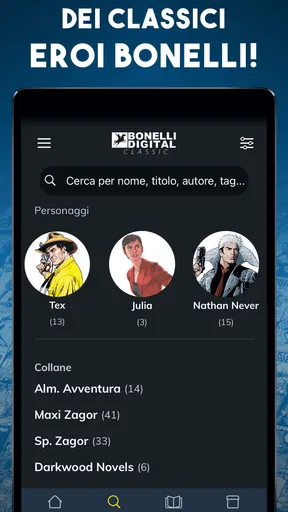
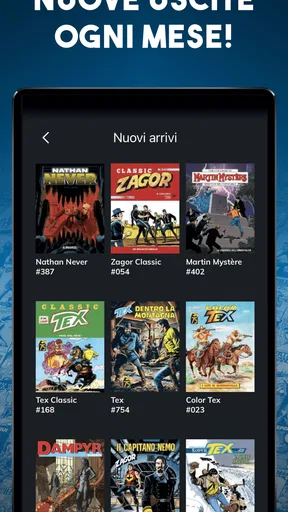
The app itself is packed with a massive collection of classic comics. We're talking about legendary titles like Tex, Dylan Dog, and Zagor. If you’re familiar with Bonelli comics, you know these are the big guns in the comic world. The library is pretty extensive, and you can easily spend hours just browsing through the titles.
For me, a focused catalogue changes the way I browse. Instead of treating the app like a general newsstand and trying to decide among unrelated publishers, I can use it to follow a particular style of Italian adventure and storytelling. That makes it a more useful choice for someone curious about Bonelli’s back catalogue than for a reader who simply wants the widest possible selection of comics.
Diving into the Content
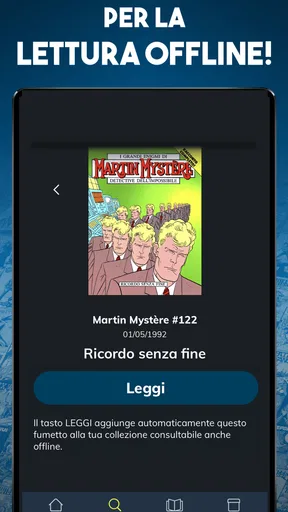
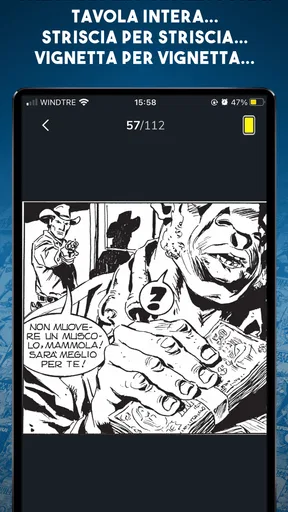
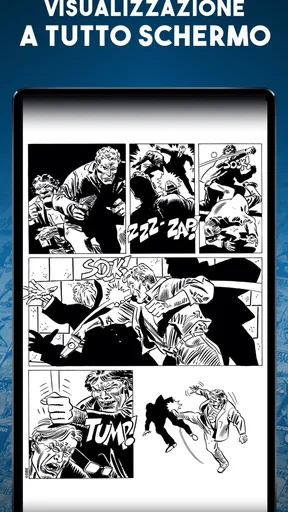
Now, let’s talk about the reading experience. Once you pick a comic, you can either download it for offline reading or dive right in if you're connected to the internet. The transition between pages is smooth, and the zoom functionality is spot on, allowing you to appreciate every detail of the artwork. It genuinely feels like holding a comic book in your hands.
Worth Reading Before You Choose

Flipboard Shows What News Apps Must Do Beyond the Feed

Switching to Android Auto Means Rethinking Your Driving Routine

Google Calendar Makes a Crowded Week Easier to Manage

Ludo King Makes the Most of the Minutes Between Plans

Baby Panda World Brings Quick Play to Modern Phones, but Its Game Library Feels Busy

ESPN’s Live Game View Makes Following Close Games Easier
Offline reading is especially practical when I know I will be away from reliable internet: I can prepare a comic beforehand rather than depend on a connection during a commute or a wait. I would make that a small routine—choose what I want to read while connected, download it, then open it before leaving to make sure it is ready. That avoids discovering at the bus stop that I had planned to read something I had not saved for offline use.
Zoom also affects how I choose where to read. On a larger phone screen or tablet, I can take in a whole page and then enlarge a panel when the art or lettering deserves a closer look. On a smaller display, I find it more comfortable to pause and zoom deliberately than to rush through pages. A comic app can make pages portable, but it cannot make a phone screen as spacious as a printed book or tablet, so readers who dislike pinching and panning may prefer a larger device.
One neat feature is the personalized recommendations. Based on what you read, the app suggests similar titles, which is great if you’re looking to explore new series. It’s like having a personal comic curator right in your pocket.
I treat those suggestions as a way to branch out, not as a complete reading plan. If I finish a story and want something with a related feel, recommendations give me a low-effort next step; if I have a specific character or era in mind, browsing the catalogue myself is more intentional. A useful habit is to note the titles that catch my eye while exploring, then return to them when I have time to commit to a longer read rather than choosing only what appears first.
Features that Stand Out
What really caught my attention is the option to create your own library. You can bookmark your favorite comics and organize them just the way you like. Plus, the app keeps track of where you left off, so jumping back into a story is effortless.
Bookmarks and reading progress solve two different problems. I use the saved library for stories I expect to revisit, while the automatic resume point is handy for a comic I am currently reading in short sessions. That distinction matters if you sample several titles: a bookmark can help you remember what you want to return to, while the last-page position keeps an active story from getting lost among those experiments.
For an everyday example, imagine having ten minutes between errands. I can open the app, continue from where I stopped, and read a few pages without needing to remember the issue or page number. Later, at home, I can spend longer on the same comic and zoom in on details. This stop-and-start pattern is where a digital reader earns its place for me: it makes a longer story easier to fit into ordinary gaps in the day.
Another thing I loved is the night mode. If you're like me and enjoy late-night reading, this feature is a lifesaver. It’s easy on the eyes and makes for a comfortable reading experience even in the darkest of rooms.
I would still keep brightness in mind rather than expecting a display setting to solve every comfort issue. In a dim room, lowering screen brightness along with using night mode can make a session more pleasant; during daylight, the opposite may be true. If you read for a long stretch, taking a break is sensible too. The feature helps adapt the interface to a late reading session, but personal comfort depends on the device and the room.
There is also a practical cost question to keep in view. The app is free, but it includes in-app purchases ranging from $2.49 to $79.99 per item. I would browse the available options and check the price attached to a specific comic or purchase before committing, rather than assuming that free installation means every item in the catalogue is included at no cost. That is a useful distinction for anyone comparing it with a service that charges a recurring subscription or with print editions bought one at a time.
Community and Interaction
Moving onto community features, while Bonelli Digital Classic doesn’t have a built-in forum or chat, it does allow you to share your reading progress and favorite comics on social media. It’s a fun way to connect with fellow fans and maybe even get some new recommendations.
That makes sharing a small extra rather than the reason to choose the app. If I want a conversation with other readers, I would expect to use a separate social platform or fan community; here, the more relevant benefit is being able to point someone toward a comic I enjoyed. Readers who want discussion, reviews, or a club-like experience inside their reading app should know that this is not the app’s central strength.
There’s also a section with the latest news and updates about the comics and their creators, which adds a nice touch. It keeps you in the loop with what's happening in the Bonelli universe.
The news area is most useful when I already have an interest in the publisher and want to keep the reading experience connected to its wider comic world. It is not a replacement for reading the stories, and I would not install the app just for updates. Instead, I see it as a modest companion to the library: something to check when I want a little context after browsing or finishing a comic.
Choosing It for the Right Kind of Reading
Compared with a general-purpose digital comic shop, the appeal here is its Bonelli identity. A broad catalogue can be better when I want to jump between publishers or genres, but it can also make discovery feel scattered. This app is a more natural fit when the goal is to explore the publisher’s comics in one place. Compared with buying a physical volume, digital reading is easier to carry and makes progress tracking convenient, while print still gives me a larger page and a more tangible reading experience.
I would recommend it most to established Bonelli readers, people curious about classic Italian comics, and anyone who likes keeping a reading queue on a mobile device. A newcomer does not need to know every character before opening it; the recommendations and browsing can help with exploration. Still, someone who expects a huge cross-publisher selection, built-in reader discussion, or an entirely free catalogue should compare alternatives before settling in.
The app has an average rating of 4.9 from 817 ratings, which suggests that many users have responded positively. I regard that as useful context, not a guarantee that its catalogue or purchase approach will suit every reader. The number of ratings is one signal; whether you enjoy Bonelli’s material and want to read it on a screen is the more important decision.
Wrapping Up
All in all, Bonelli Digital Classic is a must-have for any comic lover, especially if you have a soft spot for classic Italian comics. The app is well-designed, easy to navigate, and offers a reading experience that’s both nostalgic and fresh. Whether you’re a long-time fan or a newcomer looking to explore the world of Bonelli, this app has something for everyone.
My recommendation is a little more specific: I would try it if Bonelli’s catalogue is what you want to read, and use its library tools to make a manageable queue rather than treating it like a general comics service. Before settling on a purchase, check the individual item and think about whether you prefer reading on your current screen or in print. That small bit of planning makes the app’s strongest points—focused discovery, flexible reading, and easy return to a story—more useful in everyday life.
So go ahead, give it a download, and start your comic adventure. Who knows, you might just find your next favorite series in this digital classic collection!
Pros
- Extensive collection of classic comics.
- High-resolution images enhance reading.
- User-friendly interface for easy navigation.
- Offline access to downloaded comics.
- Regular updates with new releases.
Cons
- Limited language options available.
- Requires internet for initial downloads.
- Some issues with app stability.
- Occasional slow loading times.
- In-app purchases can be pricey.
FAQs for Bonelli Digital Classic
What is Bonelli Digital Classic?
Bonelli Digital Classic is a mobile app that offers a vast collection of classic Italian comics from the renowned publisher Bonelli. Users can explore, read, and enjoy a wide range of graphic novels and stories, all digitized for easy access on both Android and iOS devices.
Is Bonelli Digital Classic free to use?
The app itself is free to download, providing access to some free content. However, many comics are available for purchase within the app. There may also be subscription options for avid readers who want unlimited access to the entire library.
What features does Bonelli Digital Classic offer?
Bonelli Digital Classic includes features such as a user-friendly interface, customizable reading settings, and the ability to download comics for offline reading. It also offers a personalized library where users can organize and manage their favorite comics and series.
Are the comics available in multiple languages?
While Bonelli Digital Classic primarily offers comics in Italian, the app may include some titles translated into other languages. It's advisable to check the language availability for each comic within the app before purchasing or downloading.
Can I read comics offline with Bonelli Digital Classic?
Yes, Bonelli Digital Classic allows users to download comics onto their devices for offline reading. This is particularly useful for users who want to enjoy their favorite stories without needing a constant internet connection.


